8.4: Creating Animated QR Codes
As discussed in §4.3: Creating QR Codes for Addresses, QR codes are a great method for transmitting data across airgaps. They're also great for ensuring that there are no mistakes in your transmission. Unfortunately, QR codes are limited to 2953 bytes of binary data. That's sufficient for an address or a seed, but it's not big enough for most PSBTs.
Animated QRs, which use multiple frames to depict data, are the answer.
The Power of Uniform Resources
Blockchain Commons solved the problem of animated QRs with Uniform Resources, or URs, which are a methodology for encoding data as plain-text strings that are also well-formed URIs.
The specifics of encoding URs are overviewed on Blockchain Commons' UR page and fully specified in BCR-2020-005. In short, you:
- Encode your data as CBOR.
- Convert the CBOR to minimal-format Bytewords.
- Prefix the Bytewords with
ur:type/.
There are libraries that take care of all of this for you, as well a command-line program that can be used to generate minimal Bytewords format from CBOR.
The magic sauce in URs is the ability to sequence, creating multi-part URs.
This is what allows the creation of Animated QRs: data is converted to UR format and sequenced, then each individuals fragment is used as the foundation of a single frame of the Animated QR.
Create an Animated QR
Blockchain Commons doesn't currently have a command-line tool for creating Animated QRs.
Our URKit does demo the conversion of messages to animated QRs as a full MacOS app. Similarly, Gordian Seed Tool will display animated QRs for some elements.
However, the easiest method to testbed the creation of animated QRs currently is the BC-UR playground.
Create an Animated PSBT
Converting from a PSBT to an Animated QR of that PSBT is a five-step process.
We're going to use the following PSBT as an example, which is the one from §8.1.
psbt="cHNidP8BAHECAAAAAT4TNngXer/516PCopCaldswA84O2DuOrjI96CnYtkHrAQAAAAD9////AoyGAQAAAAAAFgAUDxr9tZEk6HuEqwJratxEZgdYqHmMhgEAAAAAABYAFKcU+Pe6En0kSNY4w+nQR4mTJ2XNAAAAAAABAIkCAAAAAWtqWUkvCC+bIQ0Y+RNM5sSiS4oPa9ILa4SV3YUMff7SbQEAAAD9////AteWBAAAAAAAIlEg35Pids1jTkfrgrzTG8LpPlzkPzi76pCjdVURwfnSLIhADQMAAAAAACIAID4RoDr3ZQ4gvfR2gTCkx0a0/XXWltNCC/bn0PhgobmPAAAAAAEBK0ANAwAAAAAAIgAgPhGgOvdlDiC99HaBMKTHRrT9ddaW00IL9ufQ+GChuY8BBUdSIQOTlfoZ1lEvAwQyEM0+mgOoUPeo2YbI810w8u/CgajTMSEDxX7XB3XXphZ3hRTnOP7wlGtL5O4yRAsZ9l3dbjRZg8BSriIGA5OV+hnWUS8DBDIQzT6aA6hQ96jZhsjzXTDy78KBqNMxBDgQGUciBgPFftcHddemFneFFOc4/vCUa0vk7jJECxn2Xd1uNFmDwAQDlP6zAAAA"
Creation Step 1: Convert the PSBT from Base64 (that's the standard PSBT format that always starts with cH and ends with AAAA) to hex.
This can be done from the command as long as you have access to the
(standard) base64 and xxd tools:
$ psbt_hex=$(echo $psbt | base64 -d | xxd -p -c 0)
$ echo $psbt_hex
70736274ff01007102000000013e133678177abff9d7a3c2a2909a95db3003ce0ed83b8eae323de829d8b641eb0100000000fdffffff028c860100000000001600140f1afdb59124e87b84ab026b6adc44660758a8798c86010000000000160014a714f8f7ba127d2448d638c3e9d04789932765cd000000000001008902000000016b6a59492f082f9b210d18f9134ce6c4a24b8a0f6bd20b6b8495dd850c7dfed26d01000000fdffffff02d796040000000000225120df93e276cd634e47eb82bcd31bc2e93e5ce43f38bbea90a3755511c1f9d22c88400d0300000000002200203e11a03af7650e20bdf4768130a4c746b4fd75d696d3420bf6e7d0f860a1b98f0000000001012b400d0300000000002200203e11a03af7650e20bdf4768130a4c746b4fd75d696d3420bf6e7d0f860a1b98f0105475221039395fa19d6512f03043210cd3e9a03a850f7a8d986c8f35d30f2efc281a8d3312103c57ed70775d7a616778514e738fef0946b4be4ee32440b19f65ddd6e345983c052ae2206039395fa19d6512f03043210cd3e9a03a850f7a8d986c8f35d30f2efc281a8d3310438101947220603c57ed70775d7a616778514e738fef0946b4be4ee32440b19f65ddd6e345983c0040394feb3000000
If you prefer (or if you don't have these tools on your machine), Learn Me a Bitcoin has a nice tool specifically for converting PSBTs between Base64 and Hex.
Creation Step 2: Prepare the PSBT for CBOR encoding.
The UR registry should be referenced next. It specifies how to convert any data into UR encoding using CBOR. The PSBT CDDL says that PSBTs are easy to convert: you just represent them as a bare hexadecimal.
In CBOR diagnostic notation that's:
h'hexcode'
So:
$ psbt_cbor_notation="h'$psbt_hex'"
$ echo $psbt_cbor_notation
h'70736274ff01007102000000013e133678177abff9d7a3c2a2909a95db3003ce0ed83b8eae323de829d8b641eb0100000000fdffffff028c860100000000001600140f1afdb59124e87b84ab026b6adc44660758a8798c86010000000000160014a714f8f7ba127d2448d638c3e9d04789932765cd000000000001008902000000016b6a59492f082f9b210d18f9134ce6c4a24b8a0f6bd20b6b8495dd850c7dfed26d01000000fdffffff02d796040000000000225120df93e276cd634e47eb82bcd31bc2e93e5ce43f38bbea90a3755511c1f9d22c88400d0300000000002200203e11a03af7650e20bdf4768130a4c746b4fd75d696d3420bf6e7d0f860a1b98f0000000001012b400d0300000000002200203e11a03af7650e20bdf4768130a4c746b4fd75d696d3420bf6e7d0f860a1b98f0105475221039395fa19d6512f03043210cd3e9a03a850f7a8d986c8f35d30f2efc281a8d3312103c57ed70775d7a616778514e738fef0946b4be4ee32440b19f65ddd6e345983c052ae2206039395fa19d6512f03043210cd3e9a03a850f7a8d986c8f35d30f2efc281a8d3310438101947220603c57ed70775d7a616778514e738fef0946b4be4ee32440b19f65ddd6e345983c0040394feb3000000'
Creation Step 3: Convert the PSBT to CBOR.
You now need to convert your CBOR diagnostic notation to binary CBOR
(and you might have skipped right to this, because it's really easy to
do for a bare hexadecimal number). If you have Ruby installed, you can
do this with the CBOR diagonistic
utilities. Here, we also convert
it back from binary to hex with xxd:
$ psbt_cbor=$(echo $psbt_cbor_notation | diag2cbor.rb | xxd -p -c0)
$ echo $psbt_cbor
5901d170736274ff01007102000000013e133678177abff9d7a3c2a2909a95db3003ce0ed83b8eae323de829d8b641eb0100000000fdffffff028c860100000000001600140f1afdb59124e87b84ab026b6adc44660758a8798c86010000000000160014a714f8f7ba127d2448d638c3e9d04789932765cd000000000001008902000000016b6a59492f082f9b210d18f9134ce6c4a24b8a0f6bd20b6b8495dd850c7dfed26d01000000fdffffff02d796040000000000225120df93e276cd634e47eb82bcd31bc2e93e5ce43f38bbea90a3755511c1f9d22c88400d0300000000002200203e11a03af7650e20bdf4768130a4c746b4fd75d696d3420bf6e7d0f860a1b98f0000000001012b400d0300000000002200203e11a03af7650e20bdf4768130a4c746b4fd75d696d3420bf6e7d0f860a1b98f0105475221039395fa19d6512f03043210cd3e9a03a850f7a8d986c8f35d30f2efc281a8d3312103c57ed70775d7a616778514e738fef0946b4be4ee32440b19f65ddd6e345983c052ae2206039395fa19d6512f03043210cd3e9a03a850f7a8d986c8f35d30f2efc281a8d3310438101947220603c57ed70775d7a616778514e738fef0946b4be4ee32440b19f65ddd6e345983c0040394feb3000000
You might note that all that happened is that a 5901d1 got prepended
to the hex, which is the length of the PSBT. (That's how hex is
depicted in CBOR: with just its size prepended.)
If you prefer (or didn't want to install Ruby on your machine), you can go to cbor.me, which will convert CBOR diagnostic notation (on the left of the web page) to CBOR (right).
Creation Step 4: Convert the CBOR PSBT to a UR
Encoding the CBOR as a UR now requires converting the CBOR to minimal bytewords and adding the prefix 'ur:psbt/'
Blockchain Commons has a bytewords-cli that will do the trick:
$ psbt_bw=$(bytewords -i hex -o minimal $psbt_cbor)
$ echo $psbt_bw
hkadttjojkidjyzmadaejsaoaeaeaeadfmbwenkschknrsyttsotsaoemhnymduydyaxtobatpfrmnpleyfsvsdttprpfpwmadaeaeaeaezczmzmzmaolklnadaeaeaeaeaecmaebbbscyzcremedkvskglrpyaojeimuofyiyathdpdkklklnadaeaeaeaeaecmaebbosbbyaylrdbgkidkfdtbetsrwltiflldmudiihsnaeaeaeaeaeadaeldaoaeaeaeadjeimhkgadlaydlndclbtcsytbwgsvassoegrlebsjetdbdjelrmdutlpbnkizetdjnadaeaeaezczmzmzmaotsmtaaaeaeaeaeaecpgycxurmuvokosniaglflwmlfrftecwsawlfmhhvefhetrkwdmhotkpgobyseyttddwlofzbtaxaeaeaeaeaecpaecxfmbynbftylihbacxrywkkolydyoxstfgqzzckptbmttefwbdynvdtiyahnoyrhmyaeaeaeaeadaddnfzbtaxaeaeaeaeaecpaecxfmbynbftylihbacxrywkkolydyoxstfgqzzckptbmttefwbdynvdtiyahnoyrhmyadahflgmclaxmumdzscftbgydlaxaaeybesnfmnyaxpdgdylpdtalnspwfhldywzwssalypdteehclaxskkbtsatkptsolcmktlpbbvdetzewtmwjegrvewyeyfybdcfynhlutjteehklsrtgmplcpamaxmumdzscftbgydlaxaaeybesnfmnyaxpdgdylpdtalnspwfhldywzwssalypdteehaaetbecfflcpamaxskkbtsatkptsolcmktlpbbvdetzewtmwjegrvewyeyfybdcfynhlutjteehklsrtaaaxmwzeqdaeaeaelsdastje
You then just add the UR prefix by hand:
$ psbt_ur="ur:psbt/$psbt_bw"
$ echo $psbt_ur
ur:psbt/hkadttjojkidjyzmadaejsaoaeaeaeadfmbwenkschknrsyttsotsaoemhnymduydyaxtobatpfrmnpleyfsvsdttprpfpwmadaeaeaeaezczmzmzmaolklnadaeaeaeaeaecmaebbbscyzcremedkvskglrpyaojeimuofyiyathdpdkklklnadaeaeaeaeaecmaebbosbbyaylrdbgkidkfdtbetsrwltiflldmudiihsnaeaeaeaeaeadaeldaoaeaeaeadjeimhkgadlaydlndclbtcsytbwgsvassoegrlebsjetdbdjelrmdutlpbnkizetdjnadaeaeaezczmzmzmaotsmtaaaeaeaeaeaecpgycxurmuvokosniaglflwmlfrftecwsawlfmhhvefhetrkwdmhotkpgobyseyttddwlofzbtaxaeaeaeaeaecpaecxfmbynbftylihbacxrywkkolydyoxstfgqzzckptbmttefwbdynvdtiyahnoyrhmyaeaeaeaeadaddnfzbtaxaeaeaeaeaecpaecxfmbynbftylihbacxrywkkolydyoxstfgqzzckptbmttefwbdynvdtiyahnoyrhmyadahflgmclaxmumdzscftbgydlaxaaeybesnfmnyaxpdgdylpdtalnspwfhldywzwssalypdteehclaxskkbtsatkptsolcmktlpbbvdetzewtmwjegrvewyeyfybdcfynhlutjteehklsrtgmplcpamaxmumdzscftbgydlaxaaeybesnfmnyaxpdgdylpdtalnspwfhldywzwssalypdteehaaetbecfflcpamaxskkbtsatkptsolcmktlpbbvdetzewtmwjegrvewyeyfybdcfynhlutjteehklsrtaaaxmwzeqdaeaeaelsdastje
As usual, there's an online alternative. You go to the BC-UR converter and choose "Hex (CBOR)" as the input and "Single UR" as the output, then paste your hex into the big input box. You'll also need to flag the output as "psbt" as it will start out "unknown".
Creation Step 5: Create an Animated QR
The final step of creating the Animated QR from the UR is only available online at the BC-UR Multi-UR and QR Generator.
If you used the BC-UR converter to create your UR, just click the "Send to Multi-UR" button.
If you did everything to this point on the command line, go to the BC-UR Multi-UR and QR Generator and paste your $psbt_ur into the input box
Afterward, scroll down and click "Generate Multi-UR and QR". You'll see the UR sequences show up to the top right and the Animated QR to the bottom.
If you now were to read that Animated QR into a wallet that understands animated QRs, it would hopefully pop up a screen either asking you to sign the PSBT, or telling you that it doesn't have the right key for signing. Gordian Seed Tool is a reference app that includes signing, but there are many more, as Animated QRs have come into wide use.
Review the Steps
It probably seemed like a lot of work to convert into Animated QRs. That's only because we had to string together either several command line applications or several different websites. Programmatically the process is simple:
- Convert the PSBT from base64 to hex.
- Turn the hex into CBOR by adding its size (
h'). - Convert the CBOR into a UR using minimal bytewords.
- Fragment the UR as desired, and use each fragment to generate a GIF frame.
Sign with an Animated QR
Bitcoin Core doesn't know anything about Animated QRs, which makes
sense as bitcoin-cli is a command-line program. But they're in wide
use in the larger Bitcoin ecosystems so that seeds and keys can be
held on better protected mobile devices, where they sign PSBTs
transferred through an airgap using Animated QRs.
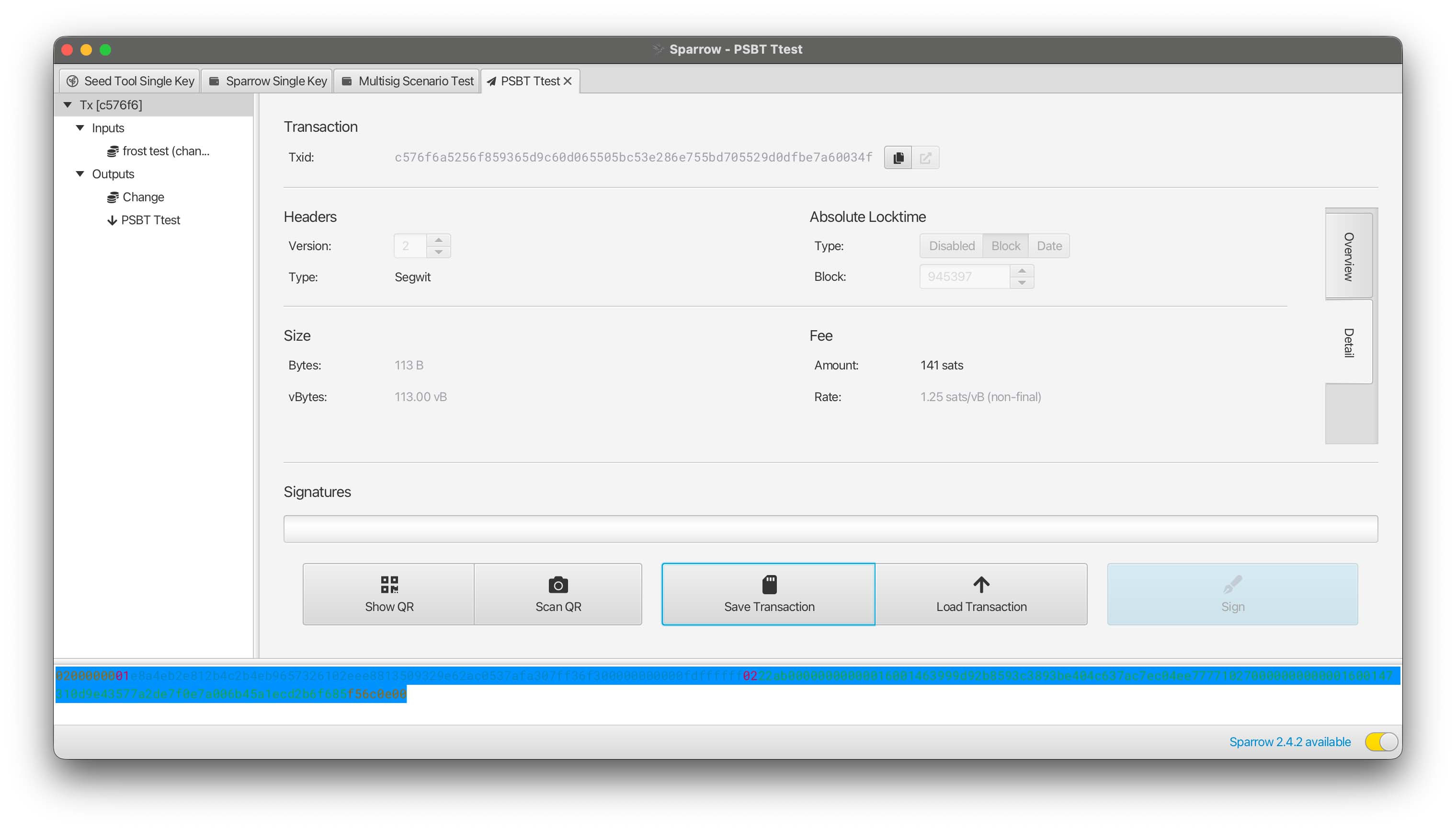
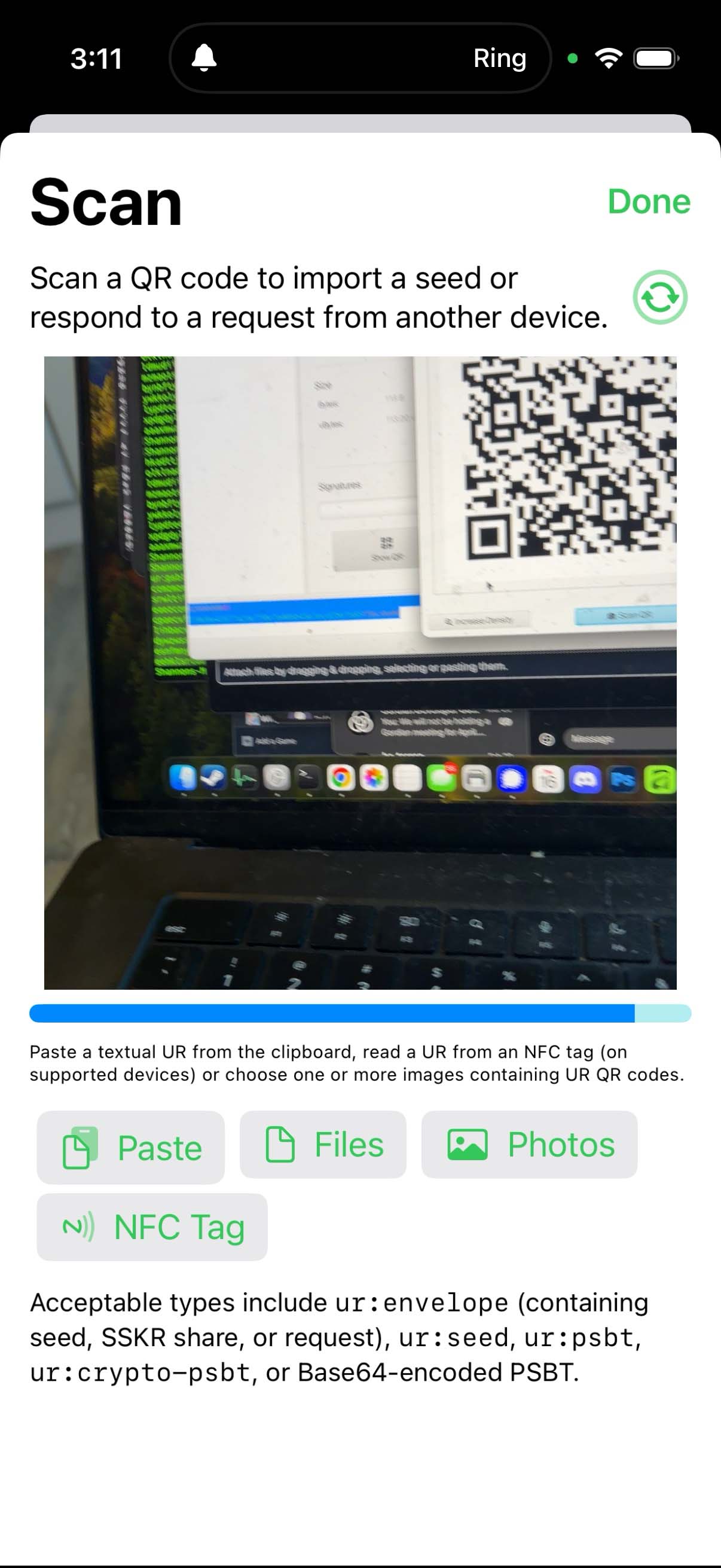
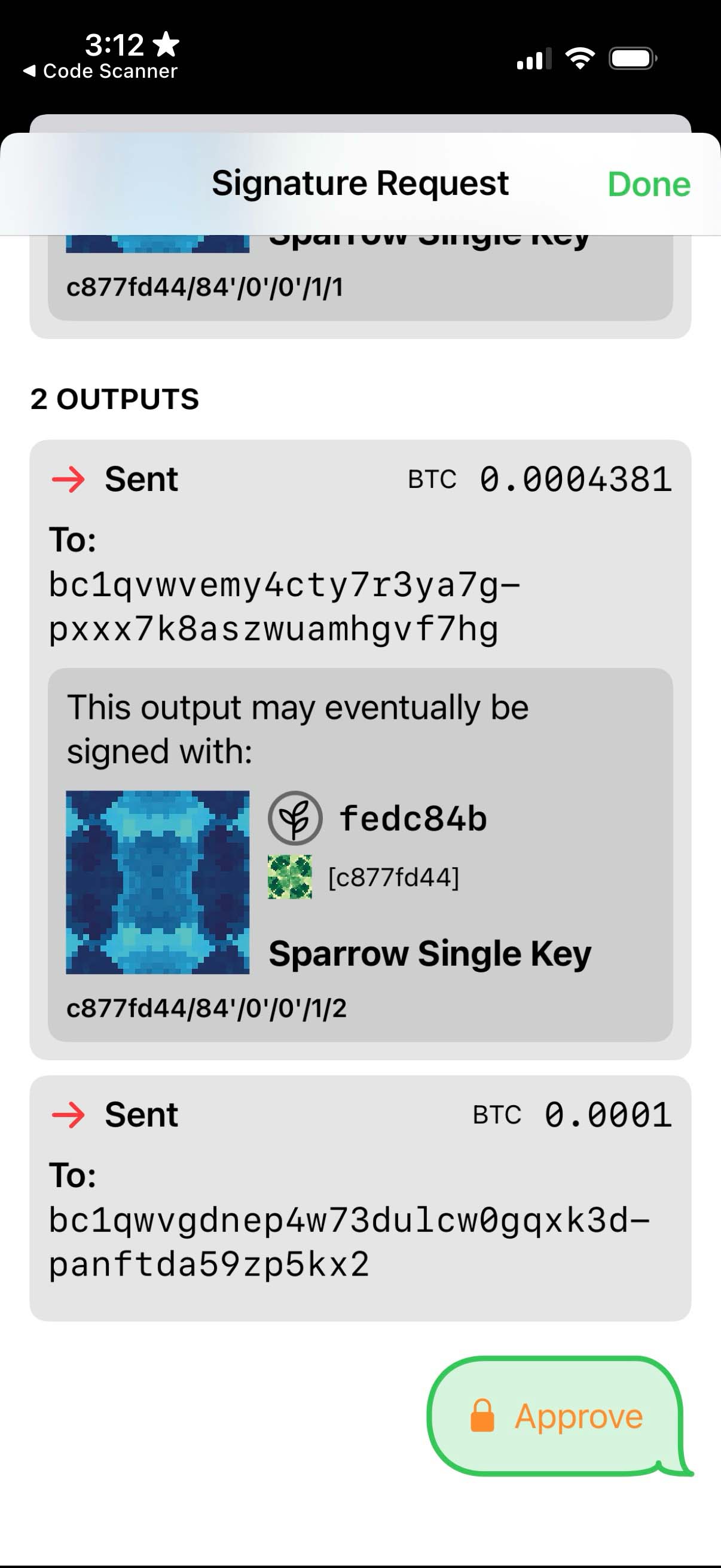
The following shows the process, using Sparrow Wallet as a coordinator and Gordian Seed Tool as a seed vault.
Signing Step 1: [Coordinator] Create the PSBT:
Signing Step 2: [Coordinator] Generate the Animated QR:
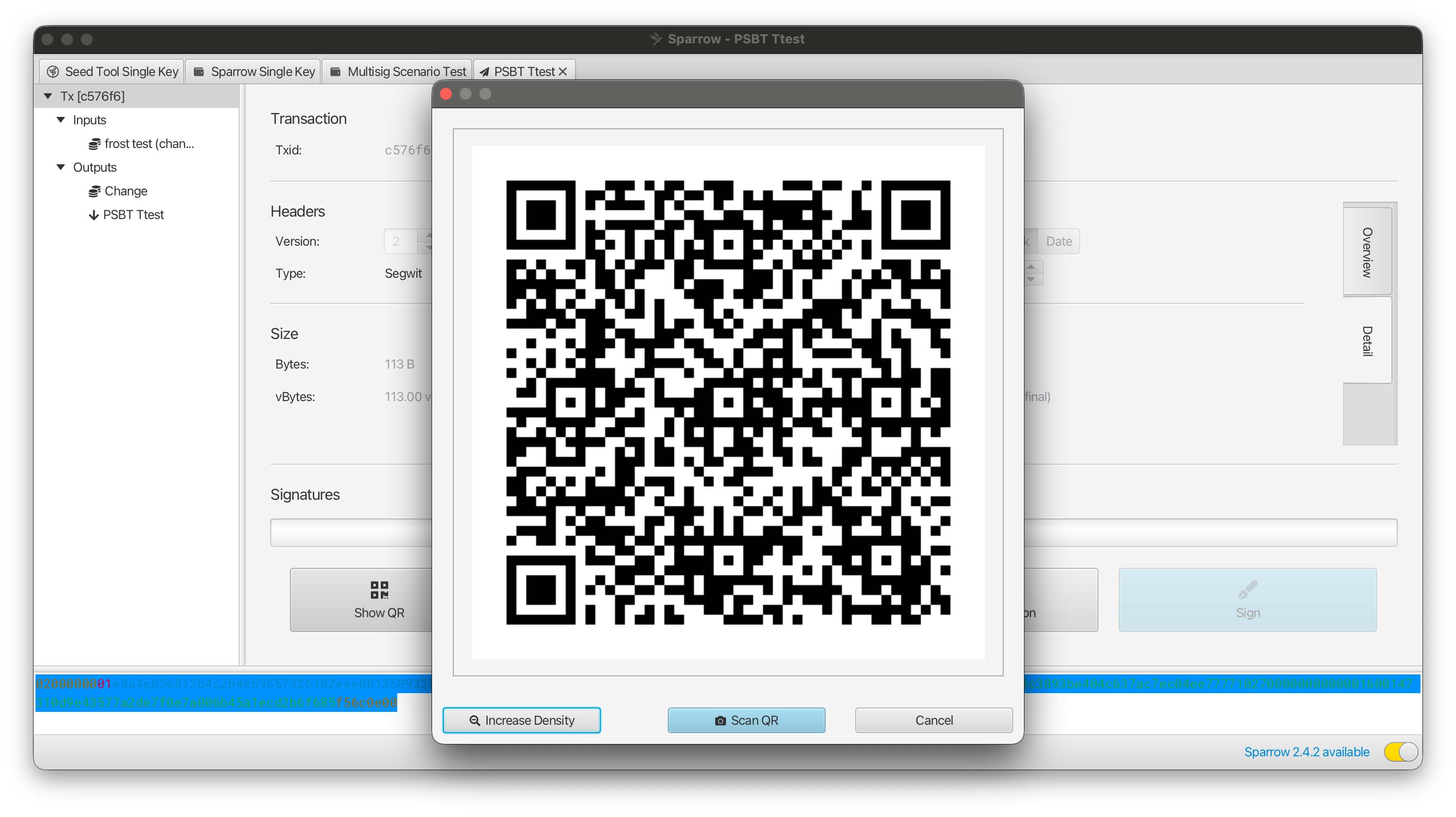
(only one frame is shown here)
Signing Step 3: [Seed Vault] Read the Animated QR:
Signing Step 4: [Seed Vault] Review the PSBT:
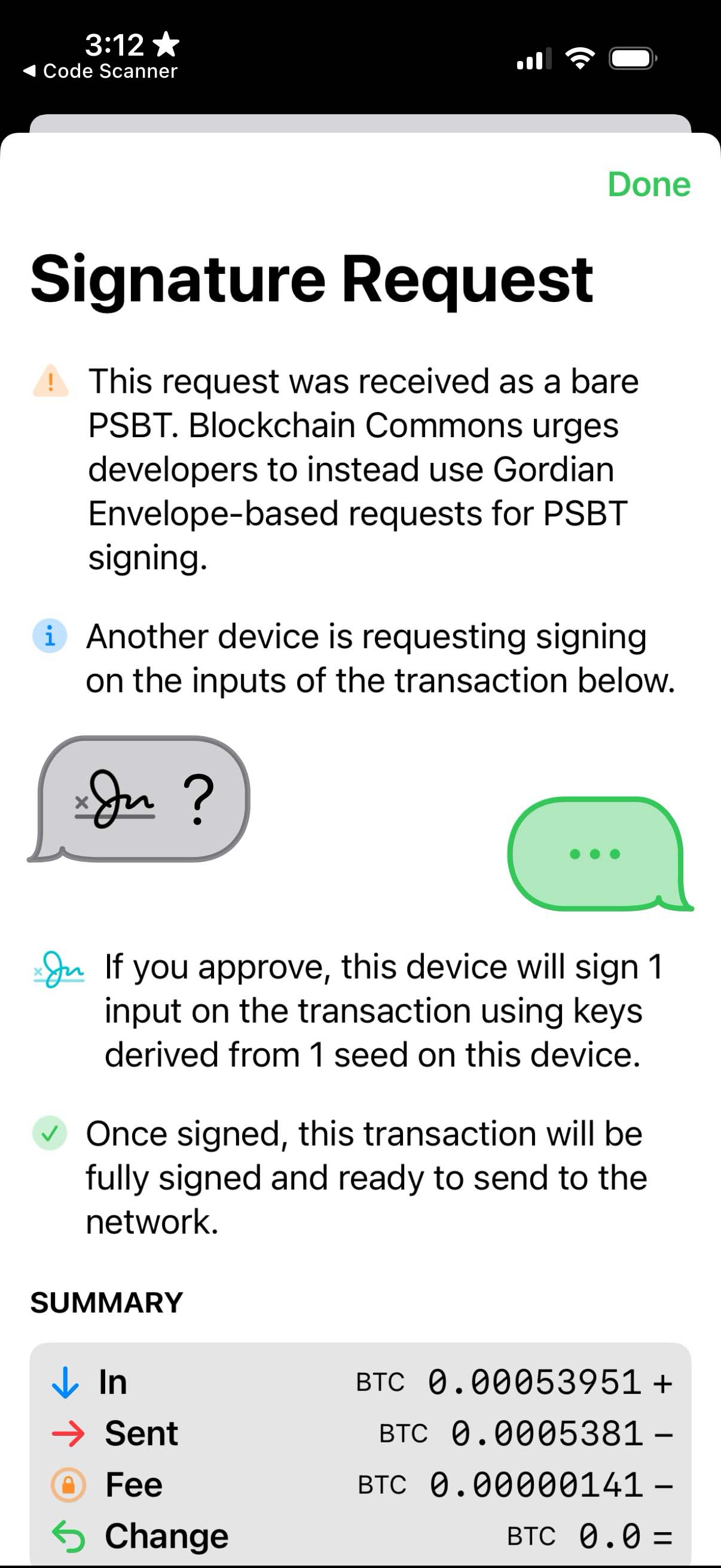
Signing Step 5: [Seed Vault] Approve the PSBT:
Summary: Creating Animated QR Codes
As with the QRs of §4.3, you won't make any more use of Animated QRs in this course, because the command line fundamentally isn't a graphical environment.
And as with the QRs of §4.3, the Animated QRs discussed here will have wide applicability when you move into the larger Bitcoin world. They are a vital tool for bridging airgaps, because QRs can't store large PSBTs.
:fire: What's the power of a Animated QRs? Animated QRs allow you to transfer larger amounts of information, such as a PSBT, across an airgap. This allows you to store seeds and keys used for signing Bitcoin transactions on a device not directly connected to the internet, making them safer and less prone to compromise. The use of Animated QRs to pass PSBTs back and forth ensures that the whole process remains easy to use.
What's Next?
Take the next step in "Expanding Bitcoin Transactions" in Chapter Nine: Expanding Bitcoin Transactions in Other Ways.